List
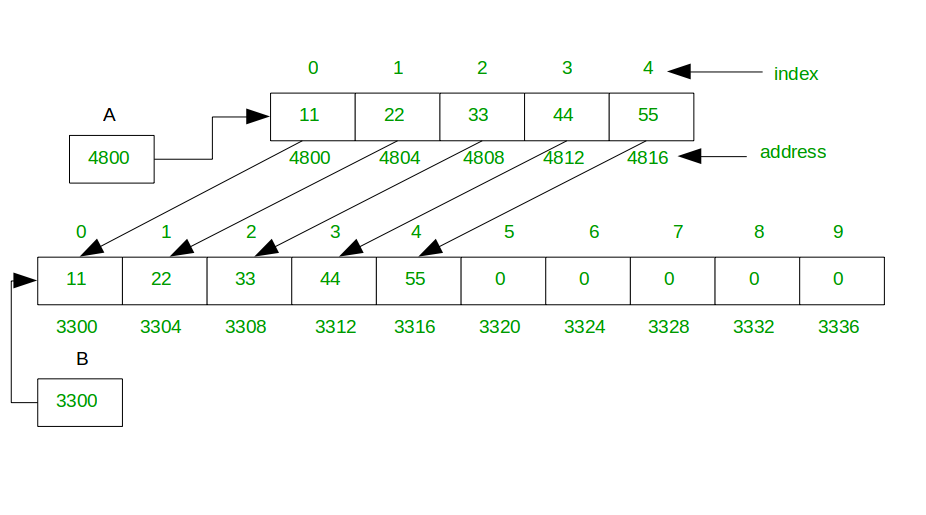
- 동적 배열 (dynamic array)
- 자료 삽입 시 저장할 공간이 없으면 자동 확장
- 자료 삭제 시 공간에 여유가 있으면 자동 축소
package org.example.list

class GenericArray<T> {
    private var size: Int = 0
    private var capacity: Int = DEFAULT_CAPACITY
    @Suppress("UNCHECKED_CAST")
    private var data: Array<T?> = arrayOfNulls<Any?>(this.capacity) as Array<T?>

    companion object {
        private const val DEFAULT_CAPACITY = 10
    }

    fun size(): Int = this.size
    fun capacity(): Int = this.capacity

    fun get(index: Int): T {
        if (index < 0 || index >= this.size) {
            throw IndexOutOfBoundsException("Index: $index, size: $size")
        }

        return data[index]!!
    }

    fun add(element: T) {
        if (this.size == this.capacity) {
            increaseCapacity()
        }

        data[this.size++] = element
    }

    fun remove(index: Int): T {
        if (index !in 0..<size) {
            throw IndexOutOfBoundsException("Index: $index, size: $size")
        }

        val removedElement = data[index]!!

        for (i in index until size-1) {
            data[i] = data[i+1]
        }

        return removedElement
    }

    fun clear() {
        for (i in 0 until size) {
            data[i] = null
        }

        size = 0
        @Suppress("UNCHECKED_CAST")
        data = arrayOfNulls<Any?>(this.capacity) as Array<T?>
    }

    fun increaseCapacity() {
        val newCapacity = this.size * 2
        data = data.copyOf(newCapacity)
    }
}
결과
fun main() {
    val dynamicArray = DynamicArray()

    println("1. Data addition")
    println("Initial Size : ${dynamicArray.size()}")
    dynamicArray.add(1)
    dynamicArray.add(2)
    dynamicArray.add(3)
    dynamicArray.add(4)
    println("Added Elements : ${dynamicArray.get(0)}, ${dynamicArray.get(1)}, ${dynamicArray.get(2)}, ${dynamicArray.get(3)}")
    println("Updated Size : ${dynamicArray.size()}")

    println("\n2. Data removal")
    println("Removed Element : ${dynamicArray.remove(2)}")
    println("Decreased Size : ${dynamicArray.size()}")

    println("\n3. Data capacity increasement")
    for (i in 0 .. 7) {
        dynamicArray.add(i)
    }
    println("Updated Size : ${dynamicArray.size()}")
    println("Updated Capacity : ${dynamicArray.capacity()}")

    println("\n4. Data clear")
    dynamicArray.clear()
    println("Cleared Size : ${dynamicArray.size()}")

    try {
        dynamicArray.get(0)
    } catch (e: IndexOutOfBoundsException) {
        println("Try get(0) : IndexOutOfBoundsException occurred")
    }
}

/*
1. Data addition
Initial Size : 0
Added Elements : 1, 2, 3, 4
Updated Size : 4

2. Data removal
Removed Element : 3
Decreased Size : 4

3. Data capacity increasement
Updated Size : 12
Updated Capacity : 10

4. Data clear
Cleared Size : 0
Try get(0) : IndexOutOfBoundsException occurred
*/List (in Generic<T>)
package org.example.list

class GenericArray<T> {
    private var size: Int = 0
    private var capacity: Int = DEFAULT_CAPACITY
    private var data: Array<T?> = arrayOfNulls<Any?>(this.capacity) as Array<T?>

    companion object {
        private const val DEFAULT_CAPACITY = 10
    }

    fun size(): Int = this.size
    fun capacity(): Int = this.capacity

    fun get(index: Int): T {
        if (index < 0 || index >= this.size) {
            throw IndexOutOfBoundsException("Index: $index, size: $size")
        }

        return data[index]!!
    }

    fun add(element: T) {
        if (this.size == this.capacity) {
            increaseCapacity()
        }

        data[this.size++] = element
    }

    fun remove(index: Int): T {
        if (index !in 0..<size) {
            throw IndexOutOfBoundsException("Index: $index, size: $size")
        }

        val removedElement = data[index]!!

        for (i in index until size-1) {
            data[i] = data[i+1]
        }

        return removedElement
    }

    fun clear() {
        for (i in 0 until size) {
            data[i] = null
        }

        size = 0
        data = arrayOfNulls<Any?>(this.capacity) as Array<T?>
    }

    fun increaseCapacity() {
        var newCapacity = this.size * 2
        data = data.copyOf(newCapacity)
    }
}
When implementing a generic DynamicArray or GenericArray class in Kotlin, you must initialize the internal array with a workaround like arrayOfNulls<Any?>(this.capacity) as Array<T?>. This is necessary because of how generics and arrays work together in the JVM (Java Virtual Machine).
Type Erasure
Kotlin's generics, like Java's, are implemented using a concept called type erasure. This means that at compile time, the specific type argument, T, is used for type checking, but at runtime, the generic type information is erased. All instances of GenericArray<Int> and GenericArray<String> will look like GenericArray<Any?> to the JVM.
Because the JVM doesn't know the specific type T at runtime, it can't create a "typed" array. You can't do this:
private var data: Array<T?> = arrayOfNulls<T>(this.capacity) // ❌ This won't compile
The compiler prevents this because it cannot guarantee that the array will hold only objects of type T at runtime.
The Workaround
To get around this limitation, you create a generic array by:
- Creating a non-generic array: You first create an array of a known, non-specific type, such as Any?. This is a type the JVM understands.This creates an array of a specified size, with all elements initialized to null.
-
Kotlin
arrayOfNulls<Any?>(this.capacity) - Casting to the generic type: You then use a type-casting operator (as) to tell the compiler to treat this Any? array as an Array<T?>.
-
Kotlin
as Array<T?>
This cast is a promise to the compiler that you will only store objects of type T in this array. The compiler trusts you to maintain this contract. If you fail to do so, a runtime error (ClassCastException) could occur when you try to retrieve an element, but your current implementation prevents this by only adding elements of type T.
참고 자료
- How do Dynamic arrays work? - GeeksforGeeks
Powered By. ChatGPT & Gemini
'Backend' 카테고리의 다른 글
| [Backend] 데이터 구조 (Stack) (0) | 2025.09.11 |
|---|---|
| [Backend] 데이터 구조 (HashTable) (0) | 2025.09.11 |
| [Backend] Generic Tutorial (Kotlin) (1) | 2025.09.11 |
| [Backend] Template Method 패턴 (1) | 2025.09.03 |
| [Backend] Observer 패턴 (1) | 2025.09.03 |